Your mail
Hi
Checking...
Getting started
0 of 6Your computer
Not linkedNot linked yet. Install the helper on your computer, then link it in Settings.
Checking...
Not linked yet. Install the helper on your computer, then link it in Settings.
Each group is one sender. Your answer is carried out at your computer's next check.
Your answer also becomes a rule on your computer, so new mail from that sender is handled the same way next time. The rules are in SORTING RULES.md, next to the helper.
The last 30 days. Everything moved went to Trash, so it can still be brought back from there.
Health only. Mail details are scrambled with each friend's own key, so they never show here.
Adding someone makes them an empty locked drawer. They only get in when you send them their setup link.
No update on the server yet.
Only Joshua sees this page.
None yet.
Put it on your home screen so it opens like an app.
The helper is a small program for a Windows computer. It reads your mail headers, scrambles them with your own key and sends them here. Your mail passwords stay on your computer.
Download the helperYour mail passwords never leave your computer. Email bodies and attachments are never read.
Senders, subjects and dates are scrambled on your computer with a key only your computer and your phones have. The server stores scrambled data only, so Joshua, the hosting company and anyone who broke into the server can't read it or fake your answers.
What it can't protect against: this page comes from Joshua's server, so someone who controlled the server and deliberately changed this page could take the key. What the server does see: that you use the app, when your computer checks in, how many groups are waiting, and error codes.
Tap the picture to see it full size.
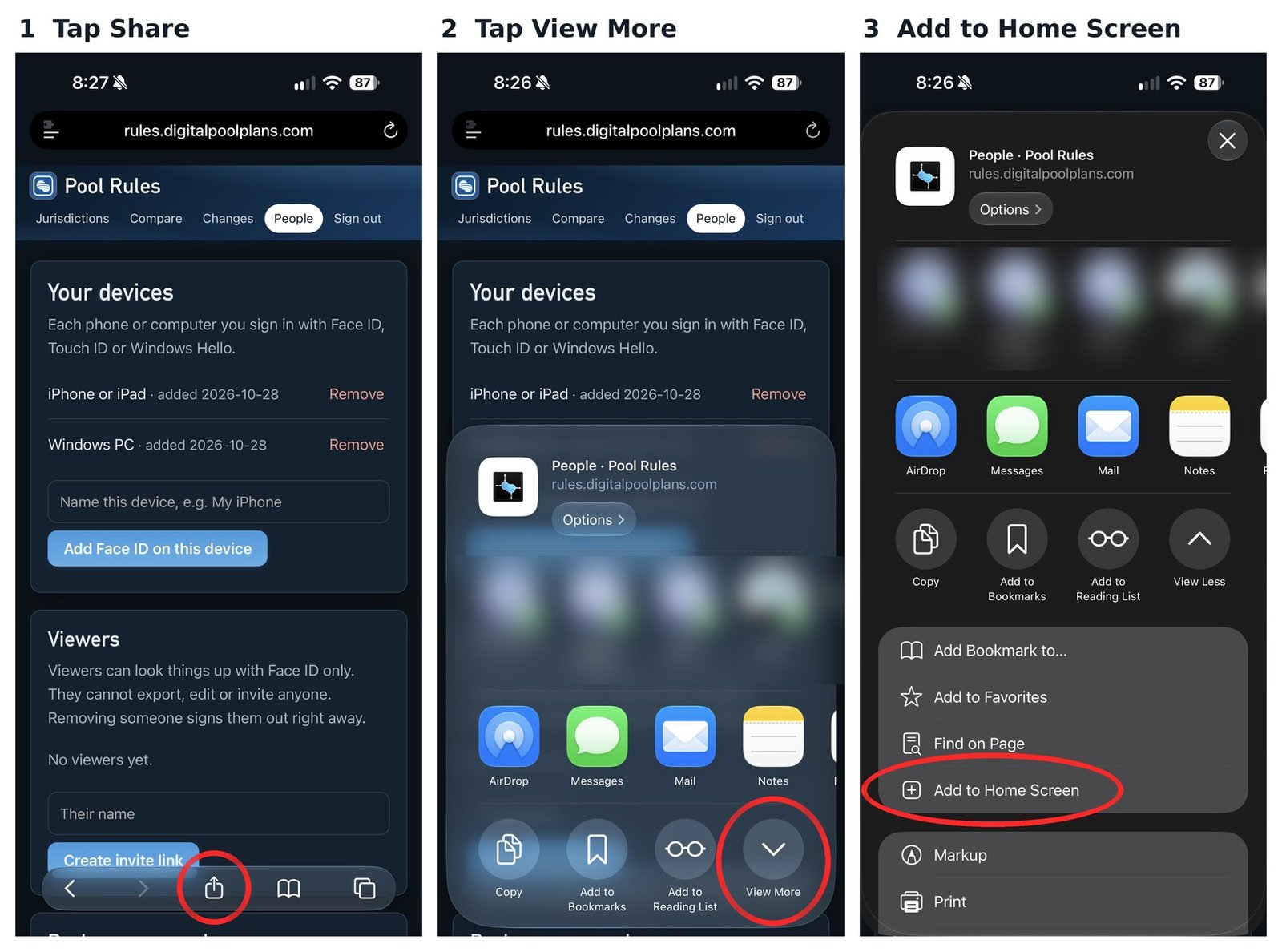
The pictures are from another of Joshua's apps. The steps are the same for Email Cleaner.
In Chrome: tap the menu (three dots, top right), then Add to home screen or Install app.
In Samsung Internet: tap the menu, then Add page to, then Home screen.
When the app is changed, a bar shows up at the top: "Email Cleaner was updated. Tap to refresh." Tap it to get the newest version. Nothing you saved is lost.
Email Cleaner can send an alert to your phone when something is ready, even when the app is closed. Turn it on in Settings (the gear, top right), then tap Allow.
On iPhone, alerts only work when Email Cleaner is on your Home Screen. Add it first (steps above), open it from the Home Screen, then turn alerts on.
Alerts are for your phone only. Signing out of this phone turns them off. To stop them, tap Turn off alerts in Settings.
Face ID or fingerprint sign-in is set up once, from a one-time setup link. After that there's nothing to remember.
New phone, or Face ID stopped working? Ask for a new setup link.
Saved on this phone.
Open the helper on your computer. It shows a 16-letter code. Type it here. This also puts your lock key on this phone.
Checking this phone...
Email Cleaner is part of Family Endeavors. Built by Joshua.